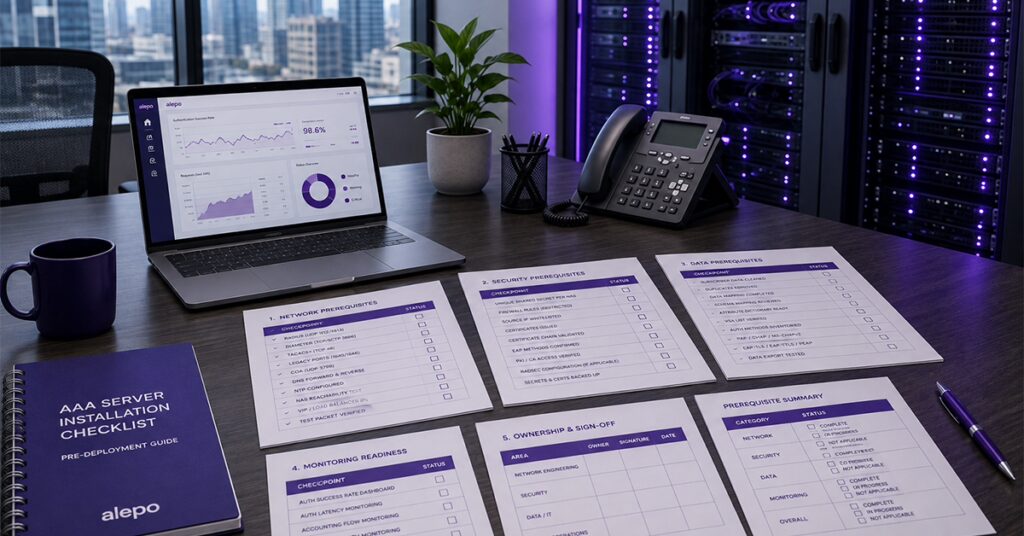
An AAA (authentication, authorization, and accounting) server installation checklist covers four categories of prerequisites that decide whether install week runs clean: network (verified port paths, DNS, NTP), security (unique shared secrets per NAS, scoped firewall rules, certificates), data (a cleaned subscriber extract mapped to the new schema), and monitoring (dashboards and alerting live before the first test transaction). Verification means a test packet crossed the path, not a rule in a change ticket. Readiness is signed off jointly by network engineering, security, and the NOC (network operations centre) – the full checklist table is below.
Most AAA installation delays have nothing to do with the AAA server. The software installs in hours; the week gets lost to a firewall rule nobody opened, a network access server (NAS) with an unrecorded shared secret, or subscriber records that turn out to be half-mapped. This checklist exists to catch those items before staging begins, not on install day.
An AAA server installation checklist covers four categories:
- Network prerequisites — ports, DNS, and NAS reachability
- Security prerequisites — shared secrets, firewall rules, and certificates
- Data prerequisites — subscriber records cleaned and mapped for migration
- Monitoring readiness — alerting hooks and NOC dashboards configured before go-live
Work through the four categories below in order, then use the consolidated table at the end as your sign-off sheet. Every item is concrete and checkable: a port number, a named file, a test packet.
Network Prerequisites for AAA Server Installation
The network prerequisites for an AAA server installation are verified port paths for every protocol in scope (RADIUS on UDP 1812/1813, Diameter on TCP/SCTP 3868, TACACS+ on TCP 49), working DNS resolution both ways, NTP on every node, and confirmed IP reachability between the server and every NAS it will serve.
A common mistake is treating this category as “the firewall team’s problem” and checking it last. Check it first, because network changes carry the longest lead times. And “verified” means a test packet crossed the path and came back, not that a rule exists in a change ticket.
RADIUS authentication and accounting run on UDP 1812 and 1813 as defined in RFC 2865 and RFC 2866; Diameter runs on TCP or SCTP 3868 per RFC 6733; TACACS+ device administration uses TCP 49. If you are still deciding which of the three belongs where, the differences between RADIUS, Diameter, and TACACS+ decide your port scope before anything else does.
Two paths deserve special attention. Older NAS equipment may still send on the legacy ports 1645/1646, so check before assuming the standard pair. And Change-of-Authorization (CoA, RFC 5176) travels from the server toward the NAS on UDP 3799 – opposite to the authentication flow – so a NAT boundary or stateful firewall that passes every authentication packet can still drop CoA without logging a thing.
Beyond ports: confirm forward and reverse DNS for every AAA node hostname, allocate and record the virtual IPs (VIPs) or load-balancer addresses NAS devices will point at, and configure NTP on every node before anything else touches them. Accounting reconciliation depends on timestamps agreeing. When node clocks drift apart, usage records stop lining up, and the mismatch reads like lost revenue.
Security Prerequisites: Shared Secrets, Firewall Rules, and Certificates
The security prerequisites are a unique shared secret generated and recorded for every NAS, firewall rules restricting AAA ports to known NAS source addresses, and server certificates issued and validated before installation begins wherever EAP (Extensible Authentication Protocol) methods such as EAP-TLS, EAP-TTLS or PEAP, or RadSec, are in scope.
Picture install day without this category done: the server is up, the first test authentication is sent, and nothing comes back. No error, no log entry that helps. A shared-secret mismatch typically produces no response at all rather than a clear rejection – RFC 2865 has the server silently discard a request it cannot validate – which is why secrets are the most expensive item on this list to get wrong late.
So handle secrets with discipline before staging. Generate a unique secret per NAS device and record each secret’s provenance: which device, which team, when. A single reused secret means one compromised box can impersonate every device that shares it – one of several reasons AAA security is a design decision rather than a configuration step.
Your inventory should already list every NAS that will talk to the server – broadband network gateways, wireless LAN controllers, packet-core nodes – with vendor, model, and software version. That list is also your firewall scope: AAA ports should accept traffic from known NAS addresses, not from the world.
Certificates are the long-lead item. If any TLS-based EAP method is in live use, the server certificates and the chain to validate them must exist before installation. The same applies to RadSec (RFC 6614, TCP 2083) if any transport leg crosses untrusted networks. Issuing a certificate through an operator’s internal PKI (public key infrastructure) process is rarely a same-day event.
Data Prerequisites: Subscriber Records Ready Before You Install
The data prerequisites are a cleaned, deduplicated subscriber extract with every field mapped to the new platform’s schema, exported attribute dictionaries and vendor-specific attributes (VSAs) from the current AAA, and a documented list of every authentication method in live use.
Data is the category most likely to slip, because it feels like a migration problem rather than an installation problem. It isn’t: the installed platform is validated against real data, and if the extract isn’t ready, validation waits or runs against samples that hide the problems.
Three work items, in order. First, the subscriber extract: pull profiles, credentials, service tiers, and policy assignments from the source of record, then deduplicate and map every field to the target schema. Flag fields with no clean equivalent now, while there is time to decide. Second, the attribute inventory: export the dictionaries and VSAs your current AAA uses, because the attributes nobody documented are where brownfield projects lose their schedule, and finding them post-install means finding them in failed authentications. Third, the method list: every authentication method in live use – PAP, CHAP, MS-CHAPv2, and each EAP variant – because each is its own configuration and test workstream.
Monitoring and Operational Readiness Before Go-Live
Installation readiness on the monitoring side means alerting hooks, dashboards, and NOC access are configured before the first test transaction. That way baseline graphs exist from minute one, and the operations team can see the platform it is about to own.
Deploy monitoring before configuration starts, not after go-live. Dashboards promised for “after cutover” have a way of staying promised, and without a baseline you cannot tell whether install-week behavior is normal. At minimum: authentication success rate and latency, accounting record flow, and per-node health, with alert thresholds agreed with the NOC rather than left at vendor defaults. Baselines also matter later, when the question stops being “is this normal” and becomes how the platform behaves under peak traffic.
Operational readiness also means people. Confirm NOC engineers have working dashboard access and a one-page runbook for the failure modes that matter in week one. And confirm sign-off itself: installation readiness should be jointly signed by network engineering, security, and the NOC/operations lead, because the checklist crosses all three domains and an item everyone assumed someone else owned is how gaps survive review.
This is also where platform choice shows. Alepo AAA Server exposes metrics and REST APIs for exactly this kind of pre-wiring, so dashboards and alerting can be built before the first test transaction rather than retrofitted after cutover. The platform runs N+1 and N+N redundancy with real-time database replication, engineered for 99.999% availability.
The Full AAA Server Installation Checklist
Here is the complete checklist in one table – the format your project tracker actually wants. Every row is checkable by one named owner before staging begins.
| Category | Item | Why it matters |
| Network | Firewall paths verified by test packet: RADIUS UDP 1812/1813, Diameter TCP/SCTP 3868, TACACS+ TCP 49 | A rule on paper is not a path; silent drops surface as install-day mysteries |
| Network | Legacy ports 1645/1646 checked against older NAS gear | Aging equipment may not use the standard port pair |
| Network | CoA path (UDP 3799) verified server→NAS | Travels opposite to authentication; NAT/stateful firewalls drop it silently |
| Network | Forward and reverse DNS for all AAA node hostnames | Broken reverse lookups cause timeouts and misleading logs |
| Network | VIPs / load-balancer addresses allocated and recorded | NAS devices need a stable target before configuration starts |
| Network | NTP configured on every node | Clock drift corrupts accounting reconciliation and billing |
| Security | Unique shared secret per NAS, generated and provenance recorded | Mismatches are silently discarded; reuse spreads compromise |
| Security | Full NAS inventory: vendor, model, software version | Defines firewall scope and the attribute dictionaries you’ll need |
| Security | Firewall rules restrict AAA ports to known NAS sources | AAA ports open to the world are an attack surface |
| Security | Server certificates issued and validated for EAP-TLS/TTLS/PEAP; RadSec certs if in scope | PKI issuance is a long-lead item; EAP fails without it |
| Data | Subscriber extract cleaned, deduplicated, mapped to target schema | Unmapped fields found post-install stall validation |
| Data | Attribute dictionaries and VSAs exported from current AAA | Undocumented attributes surface later as failed authentications |
| Data | Every live authentication method listed (PAP, CHAP, MS-CHAPv2, EAP variants) | Each method is its own config and test workstream |
| Monitoring | Dashboards and alerting live before first test transaction | Baseline graphs from minute one; no retrofit needed |
| Monitoring | Alert thresholds agreed with NOC; NOC access confirmed | Vendor-default thresholds page nobody, or everybody |
| Monitoring | Week-one runbook in NOC hands | The failure modes that matter are known in advance |
| Sign-off | Joint readiness sign-off: network engineering, security, NOC/ops | Three domains, three signatures – no orphaned items |
When every row is checked, you are ready to stage – and the installation itself becomes the quick part. If your current AAA already covers most of this list, the checklist still earns its place: it is the same list a replacement runs against, one NAS group at a time, which is where the AAA migration checklist picks up.
Run your checklist against a live platform. Bring this checklist to a demo and watch how the Alepo AAA Server handles each prerequisite against your own estate: NAS onboarding, certificate handling, and the monitoring hooks wired in from day one. Book a demo now.
Frequently Asked Questions
Q1. What should be on an AAA server installation checklist?
Four categories: network prerequisites (verified port paths, DNS, NTP, NAS reachability), security prerequisites (unique shared secrets, scoped firewall rules, certificates for EAP/RadSec), data prerequisites (a cleaned, mapped subscriber extract plus exported VSAs), and monitoring readiness (dashboards, alerting, and NOC access live before the first test transaction).
Q2. What firewall ports does an AAA server need open?
RADIUS uses UDP 1812 (authentication) and 1813 (accounting); Diameter uses TCP or SCTP 3868; TACACS+ uses TCP 49; RadSec uses TCP 2083; CoA and Disconnect-Message use UDP 3799 toward the NAS. Confirm against your specific deployment – older NAS equipment may still use legacy ports 1645/1646.
Q3. What subscriber data needs to be ready before installation?
A cleaned, deduplicated extract of subscriber profiles, credentials, service tiers, and policy assignments, with every field mapped to the new platform’s schema. Fields with no clean target-schema equivalent should be flagged and resolved before staging, not discovered during validation.
Q4. What NAS configuration is needed before AAA installation?
Each NAS needs a unique shared secret generated and recorded, confirmed IP reachability to the AAA server or its VIP, and an inventory entry with vendor, model, and software version so the right attribute dictionaries can be loaded.
Q5. What monitoring should be set up before go-live?
Dashboards for authentication success rate, latency, and accounting flow, plus alerting with NOC-agreed thresholds and confirmed NOC access. All of it should be live before the first test transaction so baseline data exists from the start.
Q6. Who should sign off on installation readiness?
Network engineering, security, and the NOC/operations lead, jointly. The checklist crosses all three domains, and joint sign-off prevents items that each team assumed another owned.
Q7. What’s the difference between installation and deployment for an AAA server?
Installation is the technical setup: verified infrastructure, prerequisites in place, platform installed and validated. Deployment is the wider project – staging, pilot, subscriber migration, and cutover. This checklist gates installation; a separate go-live checklist gates cutover.